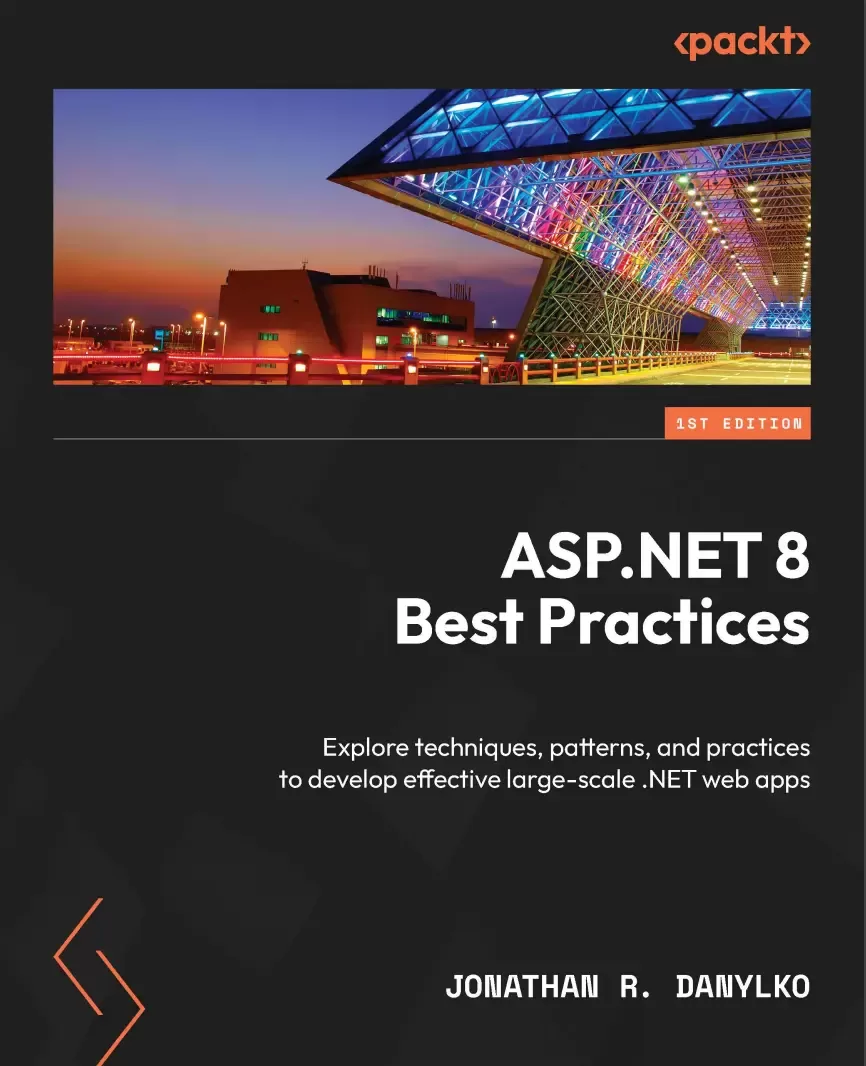
ASP.NET 8 Best Practices: Explore techniques, patterns, and practices to develop effective large-scale .NET web apps
Оглавление⌄
Cover....1 Title Page....2 Copyright and Credits....3 Dedication....4 Contributors....5 Table of Contents....8 Preface....14 Chapter 1: Taking Control with Source Control....20 Technical requirements....21 Branching Strategies....21 GitFlow....21 Hotfix branches....24 GitHub Flow....25 GitLab Flow....26 Creating short-lived branches....27 Understanding Common Practices....29 Rebase when Private, Merge when Public....29 Always “Get Latest” Before Committing....29 Always Build and Test Before Committing....30 Avoid Committing Binaries....30 Use tags for versioning....31 Summary....31 Chapter 2: CI/CD – Building Quality Software Automatically....32 Technical requirements....33 What is CI/CD?....33 Preparing your Code....34 Building Flawlessly....34 Avoiding Relative Path Names with File-based Operations....35 Confirming that your Unit Tests are Unit Tests....35 Creating Environment Settings....36 Understanding the Pipeline....36 Pulling Code....37 Building the application....38 Running Unit Tests/Code Analysis....39 Creating Artifacts....39 Creating a Container....39 Deploying the software....40 The Two “Falling” Approaches....40 Falling Backward (or fallback)....41 Falling Forward....41 Deploying Databases....42 Backing up Before Deploying....43 Creating a Strategy for Table Structures....43 Creating a Database Project....43 Using Entity Framework Core’s Migrations....44 The three Types of Build Providers....44 CI/CD Providers....45 Microsoft Azure Pipelines....45 GitHub Actions....45 Amazon CodePipeline....46 Google CI....46 Walkthrough of Azure Pipelines....47 Preparing the Application....47 Introducing Azure Pipelines....48 Identifying the Repository....48 Creating the Build....50 Creating the Artifacts....52 Creating a Release....53 Deploying the Build....56 Summary....57 Chapter 3: Best Approaches for Middleware....58 Technical requirements....59 Using Middleware....59 Understanding the Middleware Pipeline....59 Using Request Delegates – Run, Use, and Map....61 Common Practices for Middleware....63 Defer to Asynchronous....63 Prioritizing the Order....64 Consolidating existing Middleware....64 Encapsulating your Middleware....65 Creating an Emoji Middleware Component....67 Encapsulating the Middleware....67 Examining the Component’s Pipeline....68 Summary....73 Chapter 4: Applying Security from the Start....74 Technical requirements....74 Developing Security....75 Do I have any sensitive data to protect?....75 Am I exposing anything through the application?....75 Am I sanitizing user input?....76 Securing Access....76 Common Security Practices....78 Logging....78 Keep your Framework and Libraries Current....79 Always Force SSL....80 Never Trust the Client....81 Always Encode User Input....81 Securing Your Headers....82 Securing Entity Framework Core....85 Use Microsoft Entra for Securing Applications....86 Protecting Your Pages with Anti-Forgery....87 Safeguarding Against the Top 3 Security Threats....88 Broken Access Control....89 Cryptographic Failures....91 Injection....92 Summary....93 Chapter 5: Optimizing Data Access with Entity Framework Core....96 Technical requirements....97 Entity Framework Core Implementations....97 Repository/Unit of Work....98 The Specification Pattern....99 Extension Methods....103 Common Entity Framework Core Practices....105 Confirming Your Model....106 Using Async/Await....106 Logging Your Queries....106 Using Resources for Large Seed Data....107 Understanding Deferred Execution....110 Using a Read-Only State with .AsNoTracking()....111 Leveraging the Database....111 Avoiding the Manual Property Mapping....112 Implementing the Theme Park Example....113 Overview....113 Creating the Database....113 Adding an Asynchronous Read-Only Mode....114 Including Child Entities....115 Extending your Model....115 Summary....117 Chapter 6: Best Practices with Web User Interfaces....118 Technical requirements....119 Using a task runner....119 What is a task runner?....119 Setting up the Task Runner....120 Structure of a gulpfile....120 Running automatically....122 Creating a workflow structure....123 Defining our workflow paths....125 Transpiling TypeScript....126 Bundling and minifying....128 Implementing additional tasks....131 Applying standards to UIs....131 Centralizing your site links....132 Keeping controllers/pages small....133 Using ViewComponents....133 Using Tag Helpers instead of HTML Helpers....134 Creating SEO-friendly URLs....135 Introducing Buck’s coffee shop project....136 Setting up Buck’s website....136 Updating the links....139 Creating an OffCanvas Tag Helper....141 Summary....144 Chapter 7: Testing Your Code....146 Technical requirements....146 Understand testing concepts....147 Unit tests....147 Integration tests....148 Regression tests....149 Load testing....149 System testing (end-to-end or E2E)....150 UI testing....150 Best approaches for testing....151 Why do we write tests?....151 The “100% test coverage” myth....151 Using AAA....152 Avoid writing unit test code for your code....152 Avoid large unit tests....153 Avoid unnecessary mocks, fakes, or stubs....153 Using tests as documentation....153 Identifying slow integration tests....154 Find a bug, write a test....156 Avoid testing .NET....156 Testing data access....157 Adding the SQLite provider....157 Creating the AttractionService test....157 Creating the LocationService test....160 Summary....161 Chapter 8: Catching Exceptions with Exception Handling....162 Technical requirements....163 Using exception handling....163 What is exception handling?....163 When to use exception handling....164 Handling global exceptions....164 Performance considerations....167 Common exception handling techniques....167 Prevention before exception....167 Use logging....168 Apply a unit testing methodology....169 Avoid empty catch statements....170 Use exception filtering and pattern matching....170 Use finally blocks for cleanup....173 Knowing when to throw....174 Summary....175 Chapter 9: Creating Better Web APIs....176 Technical requirements....176 Creating APIs quickly....177 Using Visual Studio....177 Why minimal APIs?....180 Designing APIs....181 Disconnecting from existing schemas....181 Identifying the resources....181 Relating HTTP verbs to resources....182 Returning HTTP status codes....183 Testing Web APIs....185 Visual Studio Endpoints Explorer....185 Integration testing APIs....188 Standardized Web API techniques....191 Using the right HTTP verbs and status codes....191 Beware dependent resources....192 Pagination in API results....192 Versioning APIs....193 Use DTOs, not entities!....194 Avoid new instances of HttpClient....195 Summary....197 Chapter 10: Push Your Application with Performance....198 Technical requirements....199 Why Performance Matters....199 Establishing Baselines....201 Using Client-Side Tools....201 Using Server-Side Tools....202 Databases....206 Applying Performance Best Practices....207 Optimizing client-side performance....208 Common Server-side Practices....211 Understanding caching....218 Summary....223 Chapter 11: Appendix....226 Technical requirements....226 Programming guidelines....227 DRY....227 YAGNI....227 KISS....227 Separation of concerns....228 Refactoring as a process....228 SOLID principles....229 Project structure....236 Understanding the project landscape....236 Creating project layers....241 Summary....242 Thank you!....242 Index....244 About Packt....252 Other Books You May Enjoy....253
Описание
Коротко и по делу о том, что важно знать про best.
As .NET 8 emerges as a long-term support (LTS) release designed to assist developers in migrating legacy applications to ASP.NET, this best practices book becomes your go-to guide for exploring the intricacies of ASP.NET and advancing your skills as a software engineer, full-stack developer, or web architect.
You'll focus on ASP.NET components and gain insights into their commonalities. This book will lead you through project structure and layout, setting up robust source control, and employing pipelines for automated project building. As you advance, you'll cover middleware best practices, learning how to handle frontend tasks involving JavaScript, CSS, and image files. Additionally, you'll discover how to leverage Entity Framework Core and exception handling in your application. You'll examine the best approach for working with Blazor applications and familiarize yourself with controllers and Razor Pages. In the later chapters, you'll master components that enhance project organization, extensibility, security, and performance.
By the end of this book, you'll have acquired a comprehensive understanding of industry-proven concepts and best practices to build real-world ASP.NET 8.0 websites confidently.
What You Will Learn:Explore the common IDE tools used in the industryIdentify the best approach for organizing source control, projects, and middlewareUncover and address top web security threats, implementing effective strategies to protect your codeOptimize Entity Framework for faster query performance using best practicesAutomate software through continuous integration/continuous deploymentGain a solid understanding of the .NET Core coding fundamentals for building websitesHarness HtmlHelpers, TagHelpers, ViewComponents, and Blazor for component-based developmentWho this book is for:This book is for developers who have working knowledge of ASP.NET and want to advance in their careers by learning best practices followed in developer communities or corporate environments. Beginners can use this book as a springboard for integrating best practices into their learning journey, and as a reference to gain clarity on advanced ASP.NET topics at a later time.
На этом основные моменты по теме закрыты.
Поделиться
Частые вопросы
Можно ли скачать «ASP.NET 8 Best Practices: Explore techniques, patterns, and practices to develop effective large-scale .NET web apps» бесплатно?
Да, «ASP.NET 8 Best Practices: Explore techniques, patterns, and practices to develop effective large-scale .NET web apps» доступна для бесплатного скачивания на нашем сайте в формате PDF. Ссылка на файл находится на этой странице.
В каком формате и какого размера файл?
Книга предоставляется в формате PDF, размер файла 2,2 МБ.
Кто автор и когда вышла книга?
автор — Danylko Jonathan R., издательство Packt Publishing Limited, год выпуска 2023, 256 страниц.
О чём книга «ASP.NET 8 Best Practices: Explore techniques, patterns, and practices to develop effective large-scale .NET web apps»?
As .NET 8 emerges as a long-term support (LTS) release designed to assist developers in migrating legacy applications to ASP.NET, this best practices book becomes your go-to guide for exploring the intricacies of ASP.NET and advancing your
Похожие материалы
 Introduction to the Development of Web Applications Using ASP .Net (Core) MVC
 Pro ASP.NET Core 7. 10 Ed
 Tools and Skills for .NET 8: Get the career you want with good practices and patterns to design, debug, and test your solutions
 Apps and Services with .NET 8: Build practical projects with Blazor, .NET MAUI, gRPC, GraphQL, and other enterprise technologies. 2 Ed
 Event-Driven Architecture for Beginners using RabbitMQ and .NET: A comprehensive guide to distributed solutions with RabbitMQ and .NET
 ASP.NET Core 9.0 Essentials: Explore the .NET Core web stack, including Razor Pages, Blazor, and MVC, to build cloud-ready apps
 .NET MAUI Cross-Platform Application Development: Build high-performance apps for Android, iOS, macOS, and Windows using XAML and Blazor with .NET 8. 2 Ed
 Building Web APIs with ASP.NET Core