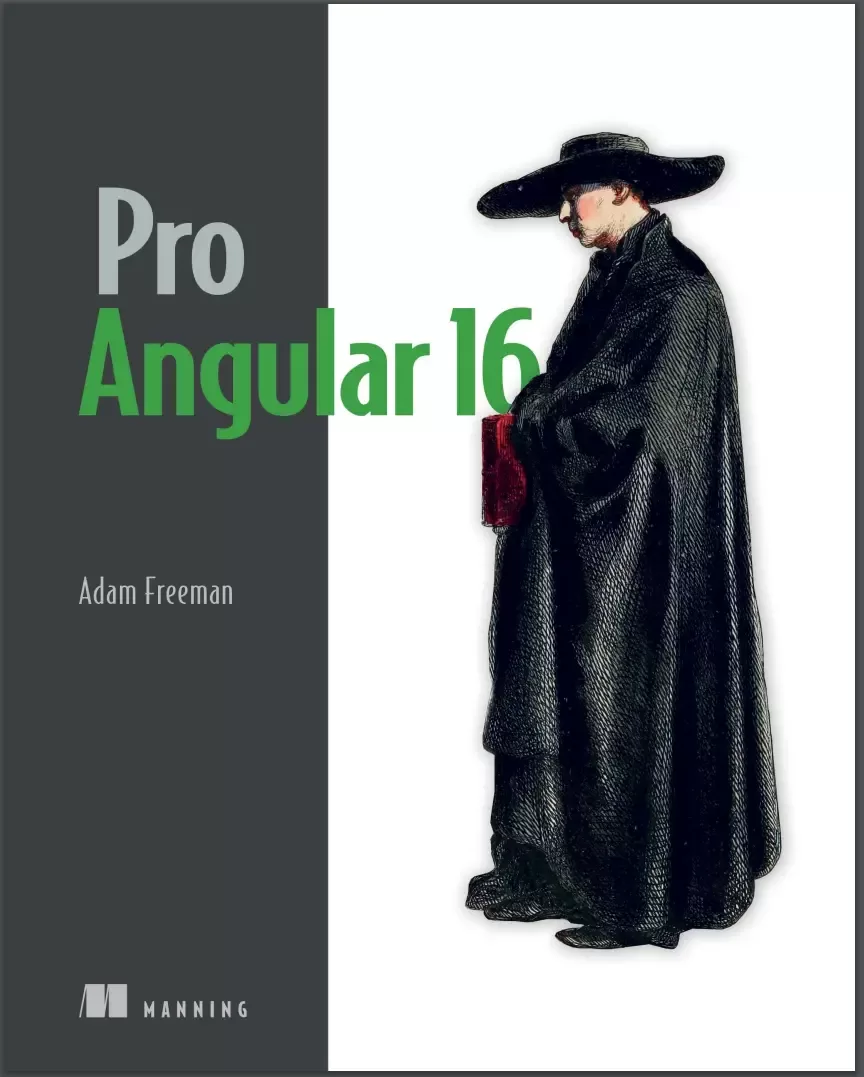
Pro Angular 16. 6 Ed
Оглавление⌄
1.1 Understanding where Angular excels....13 1.1.1 Understanding round-trip and single-page applications....13 1.2 Comparing Angular to React....14 1.3 What do you need to know?....14 1.4 What is the structure of this book?....14 1.4.1 Part 1: Getting started with Angular....14 1.4.2 Part 2: Angular in detail....14 1.4.3 Part 3: Advanced Angular features....14 1.5 What doesn’t this book cover?....15 1.6 What software do you need for Angular?....15 1.7 How do you set up the development environment?....15 1.8 What if you have problems following the examples?....15 1.9 What if you find an error in the book?....16 1.10 Are there lots of examples?....16 1.11 Where can you get the example code?....18 1.12 How do you contact the author?....18 1.13 What if you really enjoyed this book?....18 1.14 What if this book has made you angry?....18 1.15 Summary....19 2.1 Getting ready....21 2.1.1 Installing Node.js....22 2.1.2 Installing an editor....23 2.1.3 Installing the Angular development package....23 2.1.4 Choosing a browser....24 2.2 Creating an Angular project....24 2.2.1 Opening the project for editing....24 2.2.2 Starting the Angular development tools....25 2.3 Adding features to the application....27 2.3.1 Creating a data model....27 Creating the to-do list class....29 2.3.2 Displaying data to the user....29 2.3.3 Updating the component....30 Understanding the imports....31 Understanding the decorator....32 Understanding the class....33 2.4 Styling the application content....34 2.4.1 Applying Angular Material components....35 2.4.2 Defining the spacer CSS style....37 2.5 Displaying the list of to-do items....38 2.5.1 Defining additional styles....41 2.6 Creating a two-way data binding....42 2.7 Filtering completed to-do items....45 2.8 Adding to-do items....46 2.9 Finishing up....49 2.10 Summary....52 3.1 Preparing the example project....53 3.2 Understanding HTML....55 3.2.1 Understanding void elements....57 3.2.2 Understanding attributes....57 3.2.3 Applying attributes without values....57 3.2.4 Quoting literal values in attributes....57 3.2.5 Understanding element content....58 3.2.6 Understanding the document structure....58 3.3 Understanding CSS and the Bootstrap framework....60 3.4 Understanding TypeScript/JavaScript....61 3.4.1 Understanding the TypeScript workflow....61 3.4.2 Understanding JavaScript vs. TypeScript....62 Compiling the function with TypeScript....63 Using a more specific type....65 Using a type union....66 Accessing type features....68 3.4.3 Understanding the basic TypeScript/JavaScript features....69 3.4.4 Defining variables and constants....69 3.4.5 Dealing with unassigned and null values....69 3.4.6 Using the JavaScript primitive types....71 Working with Booleans....71 Working with Strings....71 Using template strings....72 Working with Numbers....72 Working with null and undefined values....73 3.4.7 Using the JavaScript operators....73 Using conditional statements....74 The equality operator vs. the identity operator....74 Explicitly converting types....76 Converting Numbers to Strings....76 Converting Strings to Numbers....77 Using the null and nullish coalescing operators....78 Using the optional chaining operator....79 3.5 Summary....80 4.1 Preparing for this chapter....82 4.2 Defining and using functions....83 4.2.1 Defining optional function parameters....84 4.2.2 Defining default parameter values....84 4.2.3 Defining rest parameters....85 4.2.4 Defining functions that return results....85 4.2.5 Using functions as arguments to other functions....86 Defining functions using the arrow syntax....87 Understanding value closure....87 4.3 Working with arrays....88 4.3.1 Reading and modifying the contents of an array....89 4.3.2 Enumerating the contents of an array....89 4.3.3 Using the spread operator....90 4.3.4 Using the built-in array methods....90 4.4 Working with objects....92 4.4.1 Understanding literal object types....93 Defining optional properties in a type annotation....94 4.4.2 Defining classes....94 Adding methods to a class....96 Access controls and simplified constructors....97 Using class inheritance....98 4.4.3 Checking object types....99 4.5 Working with JavaScript modules....100 4.5.1 Creating and using modules....100 4.6 Summary....102 5.1 Preparing the project....104 5.1.1 Installing the additional NPM packages....104 Adding the CSS style sheets to the application....104 5.1.2 Preparing the RESTful web service....105 5.1.3 Preparing the HTML file....107 5.1.4 Creating the folder structure....108 5.1.5 Running the example application....108 5.1.6 Starting the RESTful web service....109 5.2 Preparing the Angular project features....109 5.2.1 Updating the root component....109 5.2.2 Inspecting the root module....110 5.2.3 Inspecting the bootstrap file....111 5.3 Starting the data model....111 5.3.1 Creating the model classes....112 5.3.2 Creating the dummy data source....112 5.3.3 Creating the model repository....114 5.3.4 Creating the feature module....115 5.4 Starting the store....116 5.4.1 Creating the store component and template....116 5.4.2 Creating the store feature module....118 5.4.3 Updating the root component and root module....118 5.5 Adding store features....119 5.5.1 Displaying the product details....120 5.5.2 Adding category selection....121 5.5.3 Adding product pagination....124 5.5.4 Creating a custom directive....128 5.6 Summary....131 6.1 Preparing the example application....132 6.2 Creating the cart....132 6.2.1 Creating the cart model....133 6.2.2 Creating the cart summary components....135 6.2.3 Integrating the cart into the store....137 6.3 Adding URL routing....140 6.3.1 Creating the cart detail and checkout components....141 6.3.2 Creating and applying the routing configuration....142 6.3.3 Navigating through the application....143 6.3.4 Guarding the routes....146 6.4 Completing the cart detail feature....148 6.5 Processing orders....151 6.5.1 Extending the model....151 Updating the repository and data source....152 Updating the feature module....154 6.5.2 Collecting the order details....155 6.6 Using the RESTful web service....158 6.6.1 Applying the data source....159 6.7 Summary....162 7.1 Preparing the example application....163 7.1.1 Creating the module....164 7.1.2 Configuring the URL routing system....166 7.1.3 Navigating to the administration URL....167 7.2 Implementing authentication....169 7.2.1 Understanding the authentication system....169 7.2.2 Extending the data source....170 7.2.3 Creating the authentication service....171 7.2.4 Enabling authentication....172 7.3 Extending the data source and repositories....174 7.4 Installing the component library....178 7.5 Creating the administration feature structure....179 7.5.1 Creating the placeholder components....180 7.5.2 Preparing the common content and the feature module....181 7.5.3 Implementing the product table feature....185 Using the table component features....189 7.5.4 Implementing the product editor....193 7.5.5 Implementing the order table feature....197 7.6 Summary....202 8.1 Preparing the example application....203 8.2 Using pre-rendering....203 8.2.1 Installing the SSR packages....204 8.2.2 Creating the platform service....205 8.2.3 Changing the web service URL....207 8.2.4 Disabling elements....207 8.2.5 Prerendering the application....210 8.3 Adding progressive features....211 8.3.1 Installing the PWA Package....211 8.3.2 Caching the data URLs....211 8.3.3 Responding to connectivity changes....212 8.3.4 Testing the progressive features....214 8.4 Preparing the application for deployment....216 8.4.1 Creating the data file....216 8.4.2 Creating the server....216 8.4.3 Changing the web service URL in the repository class....218 8.5 Building and testing the application....219 8.6 Containerizing the SportsStore application....220 8.6.1 Installing Docker....220 8.6.2 Preparing the application....220 8.6.3 Creating the Docker container....221 8.6.4 Running the application....222 8.7 Summary....224 9.1 Creating a new Angular project....226 9.2 Understanding the project structure....228 9.2.1 Understanding the source code folder....230 9.2.2 Understanding the packages folder....231 Adding packages with schematics to an Angular project....235 9.3 Using the Angular development tools....236 9.3.1 Understanding the development HTTP server....237 9.3.2 Understanding the build process....237 Understanding the application bundle....239 Understanding the polyfills bundle....240 Understanding the styles bundle....240 9.3.3 Using the linter....243 9.4 Understanding how an Angular application works....246 9.4.1 Understanding the HTML document....247 9.4.2 Understanding the application bootstrap....248 9.4.3 Understanding the root Angular module....249 9.4.4 Understanding the Angular component....250 9.4.5 Understanding content display....250 9.5 Understanding the production build process....251 9.5.1 Running the production build....252 9.6 Starting development in an Angular project....253 9.6.1 Creating the data model....253 Creating the descriptive model class....254 Creating the data source....254 Creating the model repository....255 9.6.2 Creating a component and template....256 9.6.3 Configuring the root Angular module....258 9.7 Summary....259 10.1 Preparing for this chapter....262 10.2 Understanding Angular data flow....263 10.2.1 Adding user interaction....264 10.3 Understanding Angular change detection....267 10.3.1 The advantage of Angular change detection....269 10.3.2 The disadvantage of Angular change detection....269 10.4 Understanding Angular Signals....271 10.4.1 Using writeable signals....271 10.4.2 Using computed signals....273 10.4.3 Using effects....275 10.4.4 Using signals outside of components....276 10.5 Working with Reactive Extensions....280 10.5.1 Understanding observables....280 10.5.2 Using observables with signals....282 10.6 Summary....285 11.1 Preparing for this chapter....287 11.2 Understanding one-way data bindings....288 11.2.1 Understanding the binding target....290 Understanding property bindings....291 11.2.2 Understanding the expression....292 11.2.3 Understanding the brackets....293 11.2.4 Understanding the host element....294 11.3 Using the standard property and attribute bindings....294 11.3.1 Using the standard property binding....294 11.3.2 Using the string interpolation binding....296 11.3.3 Using the attribute binding....297 11.4 Setting classes and styles....298 11.4.1 Using the class bindings....298 Setting all of an element’s classes with the standard binding....299 Setting individual classes using the special class binding....300 Setting classes using the ngClass directive....302 11.4.2 Using the style bindings....305 Setting a single style property....305 Setting styles using the ngStyle directive....307 11.5 Summary....309 12.1 Preparing the example project....312 12.2 Using the built-in directives....313 12.2.1 Using the ngIf directive....314 12.2.2 Using the ngSwitch directive....316 Avoiding literal value problems....318 12.2.3 Using the ngFor directive....319 Using other template variables....321 Using the Index and Count Value....322 Using the odd and even values....323 Using the first and last values....326 Minimizing element operations....327 12.2.4 Using the ngTemplateOutlet directive....331 Providing context data....332 12.2.5 Using directives without an HTML element....334 12.3 Understanding one-way data binding restrictions....335 12.3.1 Using idempotent expressions....335 12.3.2 Understanding the expression context....337 12.4 Summary....339 13.1 Preparing the example project....341 13.2 Using the event binding....343 13.2.1 Using event data....347 13.2.2 Handling events in the component....350 13.2.3 Using template reference variables....351 13.3 Using two-way data bindings....353 13.3.1 Using the ngModel directive....355 13.4 Working with forms....358 13.4.1 Adding a form to the example application....358 13.4.2 Adding form data validation....361 Styling elements using validation classes....362 Displaying field-level validation messages....364 Using the component to display validation messages....368 13.4.3 Validating the entire form....370 Displaying summary validation messages....373 Disabling the submit button....375 13.4.4 Completing the form....377 13.5 Summary....378 14.1 Preparing the example project....382 14.2 Creating a simple attribute directive....384 14.2.1 Applying a custom directive....385 14.3 Accessing application data in a directive....387 14.3.1 Reading host element attributes....387 Using a single host element attribute....389 14.3.2 Creating data-bound input properties....390 14.3.3 Responding to input property changes....393 14.3.4 Requiring input property values....395 14.4 Creating custom events....397 14.4.1 Binding to a custom event....399 14.5 Creating host element bindings....400 14.6 Creating a two-way binding on the host element....402 14.7 Exporting a directive for use in a template variable....406 14.8 Summary....408 15.1 Preparing the example project....411 15.2 Creating a simple structural directive....414 15.2.1 Implementing the structural directive class....415 15.2.2 Enabling the structural directive....418 15.2.3 Using the concise structural directive syntax....419 15.3 Creating iterating structural directives....420 15.3.1 Providing additional context data....424 15.3.2 Using the concise structure syntax....426 15.3.3 Dealing with property-level data changes....427 15.3.4 Dealing with collection-level data changes....429 Minimizing Updates....432 Keeping track of views....435 15.4 Querying the host element content....439 15.4.1 Querying multiple content children....444 15.4.2 Receiving query change notifications....446 15.5 Summary....448 16.1 Preparing the example project....451 16.2 Structuring an application with components....451 16.2.1 Creating new components....453 Understanding the new application structure....455 16.2.2 Defining templates....457 Defining external templates....458 Using data bindings in component templates....459 Using input properties to coordinate between components....460 Using directives in a child component template....463 Using output properties to coordinate components....464 Projecting host element content....466 16.2.3 Completing the component restructure....469 16.3 Using component styles....470 16.3.1 Defining external component styles....471 16.4 Querying template content....473 16.5 Summary....475 17.1 Preparing the example project....477 17.2 Understanding pipes....480 17.3 Creating a custom pipe....482 17.3.1 Registering a custom pipe....483 17.3.2 Applying a custom pipe....484 17.3.3 Combining pipes....486 17.3.4 Creating impure pipes....487 17.4 Using the built-in pipes....491 17.4.1 Formatting numbers....492 17.4.2 Formatting currency values....496 17.4.3 Formatting percentages....499 17.4.4 Formatting dates....501 17.4.5 Changing string case....507 17.4.6 Serializing data as JSON....510 17.4.7 Slicing data arrays....511 17.4.8 Formatting key-value pairs....513 17.4.9 Selecting values....514 17.4.10 Pluralizing values....516 17.4.11 Using the async pipe....518 17.5 Summary....520 18.1 Preparing the example project....523 18.2 Understanding the object distribution problem....524 18.2.1 Demonstrating the problem....525 18.2.2 Distributing objects as services using dependency injection....530 Preparing the service....530 Preparing the dependent components....531 Registering the service....533 Reviewing the dependency injection changes....534 18.2.3 Declaring dependencies in other building blocks....537 Declaring a dependency in a pipe....537 Declaring dependencies in directives....539 18.3 Understanding the test isolation problem....543 18.3.1 Isolating components using services and dependency injection....544 Preparing the services....544 Registering the services....545 Preparing the dependent component....546 18.4 Completing the adoption of services....547 18.4.1 Updating the root component and template....548 18.4.2 Updating the child components....548 18.5 Summary....550 19.1 Preparing the example project....552 19.2 Understanding the root module....554 19.2.1 Understanding the imports property....556 19.2.2 Understanding the declarations property....556 19.2.3 Understanding the providers property....557 19.2.4 Understanding the bootstrap property....557 19.3 Creating feature modules....560 19.3.1 Creating a model module....561 Creating the module definition....562 Updating the other classes in the application....563 Updating the root module....565 19.3.2 Creating a utility feature module....567 Creating the module folder and moving the files....567 Updating the classes in the new module....568 Creating the module definition....568 Understanding the imports....569 Understanding the providers....569 Understanding the declarations....569 Understanding the exports....570 Updating the other classes in the application....570 Updating the root module....571 19.3.3 Creating a feature module with components....572 Creating the module folder and moving the files....573 Creating the module definition....574 Updating the other classes....574 Updating the root module....576 19.4 Summary....577 20.1 Starting the example project....579 20.1.1 Adding and configuring the Bootstrap CSS package....579 20.1.2 Creating the project structure....580 20.2 Creating the model module....580 20.2.1 Creating the product data type....580 20.2.2 Creating the data source and repository....581 20.2.3 Completing the model module....582 20.3 Creating the messages module....583 20.3.1 Creating the message model and service....583 20.3.2 Creating the component and template....584 20.3.3 Completing the message Module....584 20.4 Creating the core module....585 20.4.1 Creating the shared state service....585 20.4.2 Creating the table component....585 Creating the table component template....586 20.4.3 Creating the form component....587 Creating the form component template....588 Creating the form component styles....589 20.4.4 Completing the core module....589 20.5 Completing the project....590 20.6 Summary....591 21.1 Preparing for this chapter....593 21.2 Understanding the reactive forms API....594 21.3 Rebuilding the form using the API....595 21.3.1 Responding to form control changes....598 21.3.2 Managing control state....601 21.3.3 Managing control validation....603 21.3.4 Adding additional controls....609 21.4 Working with multiple form controls....612 21.4.1 Using a form group with a form element....616 21.4.2 Accessing the form group from the template....618 21.4.3 Displaying validation messages with a form group....621 21.5 Summary....625 22.1 Preparing for this chapter....627 22.2 Creating form components dynamically....628 22.2.1 Using a form array....629 22.2.2 Adding and removing form controls....635 22.2.3 Validating dynamically created form controls....637 22.2.4 Filtering the FormArray values....639 22.3 Creating custom form validation....642 22.3.1 Creating a directive for a custom validator....644 22.3.2 Validating across multiple fields....648 Improving cross-field validation....651 22.3.3 Performing validation asynchronously....654 22.4 Summary....657 23.1 Preparing the example project....659 23.1.1 Configuring the model feature module....660 23.1.2 Creating the data file....660 23.1.3 Running the example project....661 23.2 Understanding RESTful web services....662 23.3 Replacing the static data source....663 23.3.1 Creating the new data source service....664 Setting up the HTTP request....664 Processing the response....665 23.3.2 Configuring the data source....665 23.3.3 Using the REST data source....666 23.3.4 Saving and deleting data....667 23.4 Consolidating HTTP requests....670 23.5 Making cross-origin requests....672 23.6 Configuring request headers....673 23.7 Handling errors....675 23.7.1 Generating user-ready messages....676 23.7.2 Handling the errors....677 23.8 Summary....679 24.1 Preparing the example project....681 24.2 Getting started with routing....682 24.2.1 Creating a routing configuration....683 24.2.2 Creating the routing component....685 24.2.3 Updating the root module....685 24.2.4 Completing the Configuration....686 24.2.5 Adding navigation links....687 24.2.6 Understanding the effect of routing....689 24.3 Completing the routing implementation....692 24.3.1 Handling route changes in components....692 24.3.2 Using route parameters....695 Receiving route data with input properties....697 Using multiple route parameters....698 Using optional route parameters....701 24.3.3 Navigating in code....703 24.3.4 Receiving navigation events....705 24.3.5 Removing the event bindings and supporting code....708 24.4 Summary....710 25.1 Preparing the example project....713 25.1.1 Adding components to the project....716 25.2 Using wildcards and redirections....718 25.2.1 Using wildcards in routes....719 25.2.2 Using redirections in routes....721 25.3 Navigating within a component....723 25.3.1 Responding to ongoing routing changes....723 25.3.2 Styling links for active routes....724 25.3.3 Fixing the All button....727 25.4 Creating child routes....728 25.4.1 Creating the child route outlet....730 25.4.2 Accessing parameters from child routes....732 25.5 Summary....735 26.1 Preparing the example project....736 26.2 Guarding routes....737 26.2.1 Delaying navigation with a resolver....738 Creating a resolver service....740 Registering the resolver service....741 Applying the resolver....742 Displaying placeholder content....743 Using a resolver to prevent URL entry problems....744 26.2.2 Preventing navigation with guards....746 Preventing route activation....747 Consolidating child route guards....751 Preventing route deactivation....754 26.3 Summary....758 27.1 Preparing the example project....760 27.2 Understanding the delivery problem....761 27.3 Loading feature modules dynamically....763 27.3.1 Creating a simple feature module....763 27.3.2 Loading the module dynamically....764 Creating a route to dynamically load a module....765 Using a dynamically loaded module....766 27.3.3 Guarding dynamic modules....767 Applying a dynamic loading guard....769 27.4 Using server-side rendering....770 27.4.1 Installing the server-side rendering packages....770 27.4.2 Preparing the application....772 Undoing the routing configuration change....772 Enabling the hydration feature....773 Adding a platform detection service....774 Avoiding browser APIs....775 27.4.3 Building and running the SSR application....776 27.4.4 Enabling navigation....778 27.4.5 Modifying the terms guard....781 27.4.6 Dealing with direct navigation....782 27.4.7 Testing rehydration....786 27.5 Using prerendering....787 27.5.1 Preparing the application....787 27.5.2 Prerendering the application....788 27.6 Summary....789 28.1 Preparing for this chapter....792 28.1.1 Removing buttons....793 28.1.2 Adjusting the HTML file....794 28.1.3 Running the project....794 28.2 Using the library components....795 28.2.1 Using the Angular Material button directive....795 Adding the margin style....797 Importing the component module....798 28.2.2 Using the Angular Material table....800 Using the built-in table features....804 28.3 Matching the component library theme....807 28.3.1 Creating the custom component....807 28.3.2 Using the Angular Material theme....810 28.3.3 Applying the ripple effect....815 28.4 Summary....817 29.1 Preparing the example project....820 29.2 Running a simple unit test....822 29.3 Working with Jasmine....823 29.4 Testing an Angular component....825 29.4.1 Working with the TestBed class....825 Configuring the test bed for dependencies....827 29.4.2 Testing data bindings....829 29.4.3 Testing a component with an external template....831 29.4.4 Testing component events....833 29.4.5 Testing output properties....835 29.4.6 Testing input properties....838 29.5 Testing an Angular directive....840 29.6 Summary....842 Symbols....843 A....843 B....843 C....843 D....843 E....844 F....844 H....845 J....845 L....845 M....845 N....846 P....846 R....846 S....846 T....847 U....847 V....848 W....848 Pro Angular 16 - rimske.pdf....1 How this book is organized—a roadmap....1 About the code....1 liveBook discussion forum....1
Описание
В этом материале разберём тему: angular.
Get Pro Angular 16, the most comprehensive guide to the Angular web framework available.Thousands of web developers have relied on Adam Freeman’s Pro Angular series to get the most out of the Angular framework. Now in this revised sixth edition, Adam takes you from Angular’s basic components to its most complex functions, highlighting common pitfalls and new features such as signals.
You’ll start with the basics—plus a refresher on HTML and TypeScript. In this thoroughly updated bestseller, you’ll learn how to:Set up Angular dev tools and create projectsUse features such as components, directives, services, and pipesManage data changes with signalsNavigate app features with URL routingOptimize Angular apps with pre-rendering and server-side renderingUse popular component librariesPro Angular 16 gives you everything you need to build Angular apps that are easy to test, easy to maintain, and easy to extend and scale. You’ll quickly move on to explore Angular’s built-in functionalities and customization options, then dive into advanced features like asynchronous HTTP requests and component libraries.
About the technologyAngular is a powerful professional web framework suitable for building everything from lightweight prototypes to full-featured business applications. Created by Google and honed to perfection by millions of developers worldwide, Angular helps you deliver fast, predictable results when it counts.
This thoroughly revised book helps you build a toolbox of Angular skills, from directives and components to creating services and optimizing application delivery. About the bookNow in its sixth edition, Pro Angular 16 shows you the path to Angular mastery. Throughout, you’ll use your skills to build a professional-level project—a SportStore e-commerce complete with checkout, administration, and deployment. Along the way, you’ll pick up some great TypeScript techniques that will boost your web dev productivity.
What's insideSet up Angular dev tools and create projectsManage data changes with signalsNavigate app features with URL routingUse popular component librariesAbout the readerFor web developers who know basic JavaScript and HTML.
Если материал оказался полезен — сохраните страницу.
Поделиться
Частые вопросы
Можно ли скачать «Pro Angular 16. 6 Ed» бесплатно?
Да, «Pro Angular 16. 6 Ed» доступна для бесплатного скачивания на нашем сайте в формате PDF. Ссылка на файл находится на этой странице.
В каком формате и какого размера файл?
Книга предоставляется в формате PDF, размер файла 8,8 МБ.
Кто автор и когда вышла книга?
автор — Freeman Adam, издательство Manning Publications Co., год выпуска 2024, 848 страниц.
О чём книга «Pro Angular 16. 6 Ed»?
Get Pro Angular 16, the most comprehensive guide to the Angular web framework available.Thousands of web developers have relied on Adam Freeman’s Pro Angular series to get the most out of the Angular framework.
Похожие материалы
 JavaScript. Рецепты для разработчиков. 3 изд
 Become A Ninja With Angular
 Mastering jQuery: A Beginner’s Guide
 Professional JavaScript for Web Developers. 5 Ed
 React.js Design Patterns: Learn how to build scalable React apps with ease
 Typescript and JavaScript Coding Made Simple 2 Books in 1: A Beginner’s Guide to Programming
 React. Сборник рецептов. Практические приемы работы с фреймворком React
 JavaScript. Полное руководство: Справочник по самому популярному языку программирования. 7 изд